by Lexi » 29 Oct 2016, 16:19
When I first started blogging I was confused between the two, and all the online guides I found were written by geeks who treated you as if you were a numpty. You aren’t because if no one ever told you the difference, then how would you know? I use both; here is a brief guide to the differences in the features, in plain non-geek speak.
Wordpress.com
This is where you can
blog for FREE with a FREE subdomain attached to it (wordpress.com) for example iamlexi.wordpress.com.
• This option is quick and easy to set up (5 stages), you choose an available subdomain and you can be posting within minutes.
• As you are using the Wordpress hosting,
you cannot post any ads, but you can post affiliate links and banners within reason as in you are using them as content and not merely as an ad farm. For example, I have a beauty blog and have affiliate links to products I review, but it would violate the terms for me to have affiliate links for cars unless I was reviewing cars. You are not allowed certain things such as the usual illegal activities such as porn, drugs, or spam like activity. Wordpress will place their own ads, as these help pay for the service. (
https://en.support.wordpress.com/monetize-your-site/)
• Many people use it as a free website for example, charities, or writers use it as an author page. Donation buttons and PayPal buttons can be added, or you can sell items too such as an e-book for writers. It’s much cheaper to run (free) and you don’t have to think about hosting costs or renewals. As a subdomain you will not have any access to things such as an Alexa ranking, but there are site analytics to show which posts are popular and how many views the site had.
• There are limited themes to use. The choice is better than blogger though, and they do add themes to the selection.
• Jetpack is automatically added. This is a plugin that includes everything from a, contact form, sharing icons, social media icons, Askimet (anti-spam) and a follow me widget. I find this is so useful fro beginners, or those who want a simple blog and don’t want to have to look for plug-ins.
• There are options to upgrade by mapping a domain (using one you own already) or to buy one via Wordpress. The options are; Personal, Premium, and Business which all come with a monthly fee. They do offer a free custom domain when you sign up for one of the plans, and comes with extra features such as the ability to place your own ads, more storage, install plugins, and more themes to choose from.
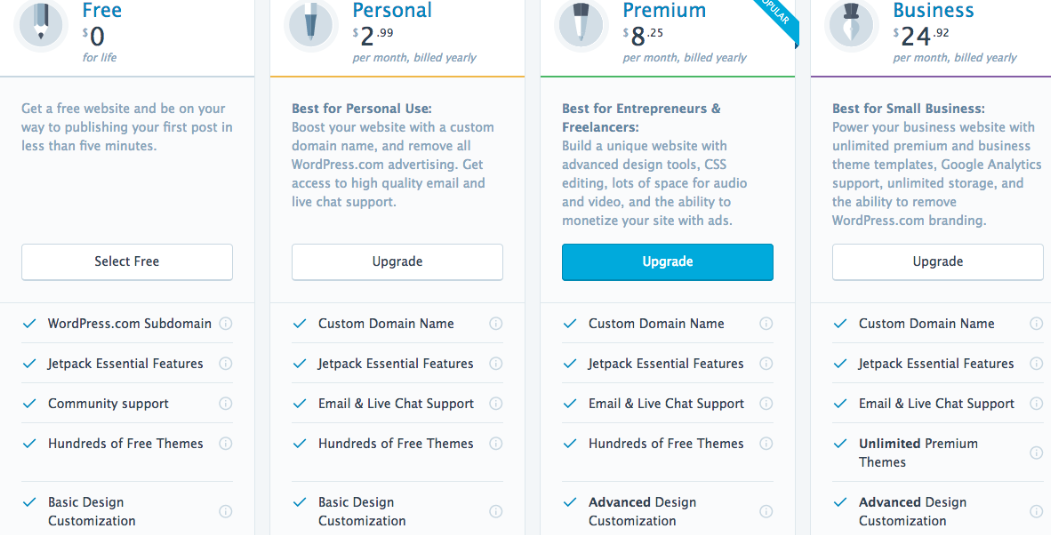
- wp_image.png (220.08 KiB) Viewed 79 times
Wordpress.org
This is where people self-host their domains and use a third party host such as Namecheap and they install the Wordpress.org software. I imagine all hosts have this option as one of the most popular platforms, and I have used quite a few hosts and they have all had the option to download Wordpress. This is not free unless you have a free domain and free hosting. I have done this in the past, but free hosting isn't always reliable and is limited these days. Some sites offer free hosting when you buy a domain.
• You must have your own domain and host to use this platform. For example, I bought a domain from NameSilo and use Namecheap hosting.
• The software is easy to use and has more themes to choose from than the .com version.
• There is nothing included, so you have to start from scratch, which includes installing a theme, but you can install Jetpack as a plug-in which has the basics while you are setting up. Although Jetpack has its critics, it is still useful for Publicize, which I like, and you can activate or deactivate features of the plugin.
• With a .org, you can place your own ads, links without any of the .com restrictions.
Both platforms perform well on search engines, but there are several things to consider. Storage and uploads can be limited on a .com site, so high pixelated images will use this up quite fast, so you should resize images. Hackers and spammers target Wordpress sites, but you can limit logins to prevent this, and also moderate comments to prevent spammers.
If you are starting out, then try a .com site first (you can make it private too), and then you can import the site over to a .org site when you have your own domain. In addition you can also migrate your followers from a .com to a hosted Wordpress site. Hopefully, now you know the difference between the two, although the admin panel is the same for both sites.
When I first started blogging I was confused between the two, and all the online guides I found were written by geeks who treated you as if you were a numpty. You aren’t because if no one ever told you the difference, then how would you know? I use both; here is a brief guide to the differences in the features, in plain non-geek speak.
[b][u][center]Wordpress.com[/center][/u][/b]
This is where you can[b] blog for FREE with a FREE subdomain [/b]attached to it (wordpress.com) for example iamlexi.wordpress.com.
• This option is quick and easy to set up (5 stages), you choose an available subdomain and you can be posting within minutes.
• As you are using the Wordpress hosting, [b]you cannot post any ads,[/b] [b]but you can post affiliate links and banners within reason[/b] as in you are using them as content and not merely as an ad farm. For example, I have a beauty blog and have affiliate links to products I review, but it would violate the terms for me to have affiliate links for cars unless I was reviewing cars. You are not allowed certain things such as the usual illegal activities such as porn, drugs, or spam like activity. Wordpress will place their own ads, as these help pay for the service. (https://en.support.wordpress.com/monetize-your-site/)
• Many people use it as a free website for example, charities, or writers use it as an author page. Donation buttons and PayPal buttons can be added, or you can sell items too such as an e-book for writers. It’s much cheaper to run (free) and you don’t have to think about hosting costs or renewals. As a subdomain you will not have any access to things such as an Alexa ranking, but there are site analytics to show which posts are popular and how many views the site had.
• There are limited themes to use. The choice is better than blogger though, and they do add themes to the selection.
• Jetpack is automatically added. This is a plugin that includes everything from a, contact form, sharing icons, social media icons, Askimet (anti-spam) and a follow me widget. I find this is so useful fro beginners, or those who want a simple blog and don’t want to have to look for plug-ins.
• There are options to upgrade by mapping a domain (using one you own already) or to buy one via Wordpress. The options are; Personal, Premium, and Business which all come with a monthly fee. They do offer a free custom domain when you sign up for one of the plans, and comes with extra features such as the ability to place your own ads, more storage, install plugins, and more themes to choose from.
[attachment=0]wp_image.png[/attachment]
[b][u][center]Wordpress.org[/center][/u][/b]
This is where people self-host their domains and use a third party host such as Namecheap and they install the Wordpress.org software. I imagine all hosts have this option as one of the most popular platforms, and I have used quite a few hosts and they have all had the option to download Wordpress. This is not free unless you have a free domain and free hosting. I have done this in the past, but free hosting isn't always reliable and is limited these days. Some sites offer free hosting when you buy a domain.
• You must have your own domain and host to use this platform. For example, I bought a domain from NameSilo and use Namecheap hosting.
• The software is easy to use and has more themes to choose from than the .com version.
• There is nothing included, so you have to start from scratch, which includes installing a theme, but you can install Jetpack as a plug-in which has the basics while you are setting up. Although Jetpack has its critics, it is still useful for Publicize, which I like, and you can activate or deactivate features of the plugin.
• With a .org, you can place your own ads, links without any of the .com restrictions.
Both platforms perform well on search engines, but there are several things to consider. Storage and uploads can be limited on a .com site, so high pixelated images will use this up quite fast, so you should resize images. Hackers and spammers target Wordpress sites, but you can limit logins to prevent this, and also moderate comments to prevent spammers.
If you are starting out, then try a .com site first (you can make it private too), and then you can import the site over to a .org site when you have your own domain. In addition you can also migrate your followers from a .com to a hosted Wordpress site. Hopefully, now you know the difference between the two, although the admin panel is the same for both sites.